Showing posts with label sound processor. Show all posts

Friday, 21 August 2020

Customised Synthstrom Audible Deluge

One of my background tasks for the past few months has been researching mid-to-high-end 'grooveboxes'. Whilst the marketplace has lots of low cost (sub $500~) examples of 'single portable boxes that can create music using MIDI and samples' (aka grooveboxes, although there are much more sophisticated and complex definitions), from Teenage Engineering's Pocket Operators, OP-1/Z, the Roland MC-101, Novation's (hard to beat) Circuit, Korg's Electribe 2, Elektron's Digitone/Digitakt and Model:Cycles, Polyend's Tracker, the 1010 Music Blackbox, plus many more, the next level up is significantly more sparsely populated and much more diverse in approaches. Doubling the budget ($500-$1000 and more) can get you a much more capable device, but I wanted to know which one was best suited to my way of thinking? 

(The title of this post kind of gives away the end result, of course!)

Many years ago, I remember being greeted with a certain amount of disbelief when I expressed my opinion that the major deciding factor in choosing a DAW should be the workflow and its alignment with your own internal mental model of how to make music. It seemed that brand-name, who else used it, resolution, number of tracks, latency, bundled plug-ins and many other factors were far more important to many people. My opinion hasn't changed, although I have found that I have increasingly moved to the 'boutique' end of the market: small, independent manufacturers who tend to be musicians and technologists. As an example, my most sophisticated pedal is a Poly:Digit, which isn't exactly mainstream...

The other vitally important word in that brief definition is 'single'. When I go away from a DAW with access to external hardware synths and effects, into the 'live performance' scenario, then I'm looking for ideally one box, and probably three boxes maximum. I've played the game of having lots of equipment to set up and tear down, and like most people who have done that more than a few times, I have decided that:

Simplicity Means Less To Go Wrong! 

But back to those 'next level up' grooveboxes. So what are the main contenders? I whittled the list down to these:

- Elektron Octatrack (mk1 or mk2 (mk2 is a makeover that is probably more like a 1+))

- Roland MC-707

- ModDuo X

- Synthstrom Audible Deluge

- Akai Force

- plus a few others that were fighting for attention (MPCs!), and I even considered a few no-longer-current devices - even though trying to find second hand gear can be stressful... 

As always, your favourite is probably missing from this shortlist. Note that I deliberately rejected these whole categories:

- hardware 'sequencer-only' devices (no Squarp Pyramid or Polyend Seq or Social Entropy Engine...) 

- hardware controllers that require a DAW or computer (NI Maschine, Ableton Push...)

- modular 'sequencers plus a few modules'. (Creeping module purchases means your rig is never quite finished...)

My opinions

After months of careful research, here's my personal opinions:

- Elektron Octatrack. 

The Octatrack has been bubbling under on my GAS list for a long time. And that's probably the main issue - it has been around for so long that it may be about to be replaced, and I hate buying something which is immediately replaced by something much better for less money! 

Pros. Flexible sample playback, a song-mode sequencer (the Digitone and Digitakt lose points because of their lack of song support), and some neat processing. The eight channle scan also be used as a mixer, which is interesting. Looping support is also good. The Mark II's slider control is definitely a good reason to go for this in preference to the Mark I.

Cons. Seems to be difficult to learn. This might be the classic 'I will say it is hard to use because that makes me look good!' situation, but the YouTube video's of people using Octatracks seem to reinforce the amount of learning that is required. Is complexity what I want in a live environment? Probably not. Also, most people seem to use other gear with an Octatrack, so that's a concern. Finally, there's the nagging doubt that there's probably a Mark III in the pipeline, or maybe even a total revision.

- Roland MC-707

My first album was recorded using a TB-303, a TR-606 a Sequential Pro-One and a Casio CT-1000, and I've currently got a heavily modded TR-505, so I'm no stranger to Roland gear. The MC-707 is kind of what I reckon an Elektron Octatrack 3 might be like, although with a different workflow...

Pros. Ableton Live-style grid is a plus. Lots of immediately editable sounds without any need for a computer (probably the top feature request for the Novation Circuit 2). 

Cons. No song-mode is a major disadvantage. At the sub-$500 price-point then this is acceptable, but I've spent too long with old school drum machines to want me to be constantly controlling what is happening. No way to send MIDI CCs might also be a problem if I was going to use it with anything else... No 'Scale' mode for the buttons is weird when most of the sub-$500 group have this! Having to effectively sacrifice a track to sequence external MIDI is strange, but again, for a single box then this is not as important as it might be if I was using this as the centre-piece of a studio. 

- ModDuo X

I've been trying to buy one of these for over a year now, and it seems to be permanently out of stock, with pre-orders all being consumed in a few seconds of the site accepting them. So I've more or less given up on this one. I talked to Mod at one of the Ableton Loop events, and they seemed very confident, maybe not in a good way. Given their apparent supply chain problems, maybe my gut feeling was correct... 

- Synthstrom Audible Deluge

Definitely a 'boutique' device, this goes against the grain in all the right ways. No display - well, not a display in the conventional sense, although if you scaled up a Novation Circuit, it could well look a lot like this. An interesting design, with unusual/novel controls that make a lot of sense. 

Pros. Small, light, song-mode (plus arranger functions), Subtractive and FM synths, sample replay, and looping. Comprehensive features and a very good firmware update policy (frequent!). Seems to think the same way that I do!

Cons. Using the display as the main control means that you can spend a lot of time jumping in and out of song mode. As with the Octatrack, there seem to be a lot of shortcuts that require muscle-memory to learn. 

- Akai Force

I immediately thought of a 'DAW in a box' when I first saw this, and this is too much like a Push and Ableton Live. I would struggle to say that I was 'DAWless' if I used one of these.

The result?

I went for a Synthstrom Audible Deluge (a 'Deluge' from this point onwards). It offered the features I wanted, the size and weight and convenience, and a pretty good 'single box' solution. When it arrived, the adapter envelope had a note on it:

So I took the 'Martin :)' and turned it into a label for the top panel:

So if you ever see a 'Martin :)' where you were expecting a Deluge, then that will be me!

---

I will report on my progress with the Deluge as I get familiar with it... So far, I'm definitely enjoying it!

---

If you find my writing helpful, informative or entertaining, then please consider visiting this link:


Synthesizerwriter's StoreSynthesizerwriter's Store
 (New 'Modular thinking' designs now available!)


Tuesday, 30 August 2016

Audio environments from frozen spectral grains...

Atmospheric sounds


You hear them all the time, but mostly they slip under the radar. Environmental sounds are the background 'atmosphere' that pervades spaceships, control rooms, power stations, busy offices, streets, and everywhere else. The classic 'bridge sound' from the original Star Trek is a perfect example: if you hear a few seconds of it you know exactly what it is, and yet most of the time you aren't are of it. Like a lot of audio that underpins moving pictures, your eyes are distracted, and the sound plays a strong supporting role. But remove the sound, and suddenly the pictures aren't as compelling or interesting.

Music uses background sounds too. On stage, the atmosphere built up by the right sound gradually rising from subliminal to noticeable can make the reveal of the musicians all the more an event. Staging isn't just lights... And during a set, the right background sounds can control mood as well as provide links between songs.

Crafting atmospheric sounds requires a lot of knowledge about the way that sounds work on people. It also eats up source material, which is why making background sounds is a challenge, and it explains why some of the most popular plug-in downloads aren't what you might expect. 'Sound Generators' are a key part of the tools that creators use, along with the audio editing software and  sound effects library that you were probably expecting.

Grainy spectrums

Granular synthesis is very popular at the moment, and there are a lot of software instruments that are devoted to producing sounds using little fragments of sound. But creating frozen spectrum grabs is only part of the solution, mainly because freezing a sound produces a static spectrum, and that quickly gets boring. Just as movement makes movies engaging, evolution makes sounds interesting. Recently, I've been looking at various ways of capturing spectral fragments, and I've struggled to turn them into something that I can use.

So, my latest Max For Live plug-in for Ableton Live is specially designed to turn audio fragments into atmospheric background sounds. It is a sound generator based on grains instead of the longer samples (or FM or feedback algorithms) that are often used. gFreez_mr allows the capture and playback of four separate grains of frozen spectra, and then uses a four-phase LFO and LFO-controlled panning to animate those four components into a constantly shifting atmospheric sound. gFreez_mr is particularly good for synthetic, electronic sounds, and it has a number of functions that are specifically designed for live use.

gFreez_mr

First things first - you need to be able to play the audio samples in Live, and Simpler is perfect for this, although you can use Sampler and any other sample player you like. gFreez_mr is an audio effect, and so goes after the sample player:


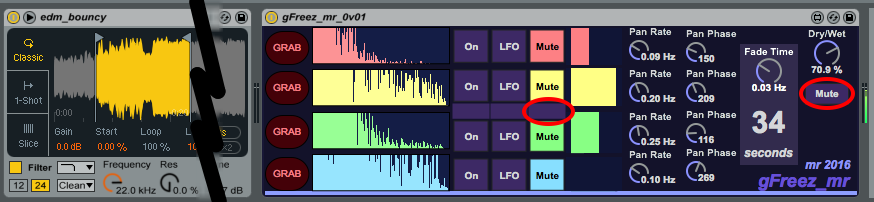
gFreez_mr has four horizontal 'slots' for the grains, and those empty boxes on the left hand side are where these will appear. The first thing to do is to set the 'Dry/Wet' mix control to slightly dry, and the 'button underneath it to 'Input' instead of 'Mute'. This button routes the input of gFreez_mr to the output so that it can be heard whilst the grains are being captured (the 'Mute' setting is used during playback). The top slot control buttons should also be set to 'On', so that the output of that slot is permanently audible. When you play a sound from Simpler (either via MIDI, or the virtual keyboard: A, W, S, E, D, F, etc.), then you should hear the sound in the output of the gFreez_mr effect. To actually capture the audio, you click on the 'GRAB' button on the far left. This will grab the spectrum of the sound (in stereo) and you should hear this as the output of the effect, and the spectrum will be shown in the slot:


The 'top slot control buttons should now be set to 'Mute' so that the sound is no longer heard, and the second slot should be set to 'On' and a new spectrum grain grabbed. When you have repeated this for all four slots then gFreez_mr will look like this:

Note that since we have now captured all of the four slots, then the 'Input/Mute' button on the far right has been set to 'Mute' so that we will no longer hear any audio from the sample player. The small row of buttons in the centre of the four slots affect all of the slots, and so clicking in the 'Mute' column will set all of the slots to muted, and so no audio will be heard at the output. You can also just click on the slot control button if you wish.

Playback

The easiest way to set all of the four slots playing at once is to use the small row of buttons in the centre again - this time in the 'LFO' column:


This sets gFreez_mr playing all of the slots, an you will se the four volume indicators in the centre right moving back and forth. The larger the block, the louder the volume, and the LFO has four phases, so each slot fades in and out in order. The 'Fade Time' rotary control sets the rate of the LFO, and because the actual time for a complete cycle is important in this type of sound generator, then the time for a cycle is indicated in large numbers - '34 seconds' in the screenshots here.

As well as smoothly fading each slot in and out in sequence, there are pan controls for each slot. The rate controls the rate of auto pan of the left and right channels of the stereo spectrum grains. The 'phase' controls alter the relative phase of the panning LFO for the two stereo channels - so hen they are the same, then you get conventional panning of the stereo grains, but if you set them to '180' degrees apart, then the two channels will be panning in anti-phase, and you will hear the two channels separately (assuming the spectra are different enough!). Setting the pan controls can make the output sound animated and interesting, and can helps to hide the repeats of the main 4-phase LFO cycle. If you set the pan rate to zero, then there is no panning...

 Live updating

As an additional way to hide the repetitions, you can update the slots whilst gFreez_mr is playing. The process is as follows:

1. Wait for the volume block in your chosen slot to drop to zero, then 'Mute' that slot. You can now 'Grab' a new spectrum, although you won't be able to hear it because the 'Input/Mute' button will be set to 'Mute' to prevent this. (You can always set the 'Input/Mute' switch to 'Input' so you can hear it, but your audience will hear it too!) I tend to go by the spectrum display when I'm doing this live updating, and you should quickly get the hang of assessing kind of what a grain will sound like based on the spectrum.
2. Play the sound you want to grab, and click on the 'GRAB' button. The spectrum display will update with the new grain. (If you don't like th look of th spectrum, then just grab the spectrum of another sound by repeating this step!)
3. Wait for the volume block for that slot to get to zero again, and quickly click on the 'LFO' button. The new slot will then be included in the new cycle.


This process isn't as tricky as it might sound, and it enables much longer sounds to be generated live.

Sounds

Remember that gFreez_mr does not capture samples - it captures the spectrum of a very short piece of audio: a grain. So the sound that you hear from each slot is that spectrum turned back into sound - a very simple resynthesis process. This type of sound generation has limitations, and there is a distinctive character to the sounds, but there is a pretty wide variation of timbres, and mixing in real samples can provide additional variation in an audio editor.

This first version of gFreez_mr does not save the spectral grains, and so it is intended for live use. Future versions may add additional functionality, of course. Anyway, have fun with this first version, available as usual from MaxForLive.com.

Audio demo at: https://soundcloud.com/martinruss/gfreez_mr-demo-01-edited