
Showing posts with label virtual instrument. Show all posts

Sunday, 7 August 2022

How to create Pianobook.co.uk 'Extras'

For the whole month of August, I've been voted into the prestigious role of 'Samplist of the Month' for Pianobook.co.uk by the eponymous Discord community, and I wanted to mark it with something special...

So on the 1st of August, I published two new sample packs of virtual instruments on Pianobook.co.uk: 'Deimos Strings', and 'Fairy Piano Extras'. The following day I published a second experimental sampled choir virtual instrument called 'Dan Time 2', but that's another story entirely.

Deimos Strings

Not one of the moons of Mars...

Deimos Strings is string pads produced digitally, but with a lot of the characteristics that people normally associate with analogue synthesis. At its heart are a dual filter and a quad chorus effect, and there's a bug in the filter control XML, but it sounds interesting, so I have left it in! The quad chorus also has a slight volume dip as you increase the modulation depth, but this is easily compensated for by using the Expression control. There are quite a few presets, and there's an amazing demo from Bemused on SoundCloud.  

But the 'special' bit is the other release:

Fairy Piano Extras

I've been doing a lot of reviewing at the quieter end of the Pianobook.co.uk review queue - where the sample packs of virtual instrument with no or very few reviews live. I try to review any Decent Sampler submissions, and I have now done quite a few reviews! 

One thing that I often do in my reviews is suggest little additions or modifications to the XML file that is the .dspreset file that defines a Decent Sampler preset. Often this is just turning on looping so that you get interesting syncopation during the release phase of the envelope, but sometimes I get inspired and do lots more modifications. And then I had an idea...

Why not make these 'Extra' presets available to everyone on Pianobook.co.uk?

Which is what 'Fairy Piano Extras' is - three additional presets for my pre-existing 'Fairy Piano' sample pack, but going slightly beyond just making a few changes to the values of the controls. In an 'Extra', anything is allowed, except changing the samples, and you need to get the permission and final approval of the original publisher of the sample pack, of which more in a moment... So you could do things like:

- Transpositions in round-robins for Victor Borge soundalikes, automatic inversions, and more, 

- Micro-tuning in round-robins for subtle detunes or crazy 'honky-tonk' wobbles,

- Dynamic tweaks, inversions, layering and other sample playback modifications,

- New controls for new features! Want to add a High-Pass Filter? Easy! Want to be able to change the Reverb Room Size? Easy? Make a menu to turn looping on and off? Needs a bit of care, but do-able! In Fairy Piano Extras, the 'Drone' preset has new additional controls that weren't needed in the original Fairy Piano:
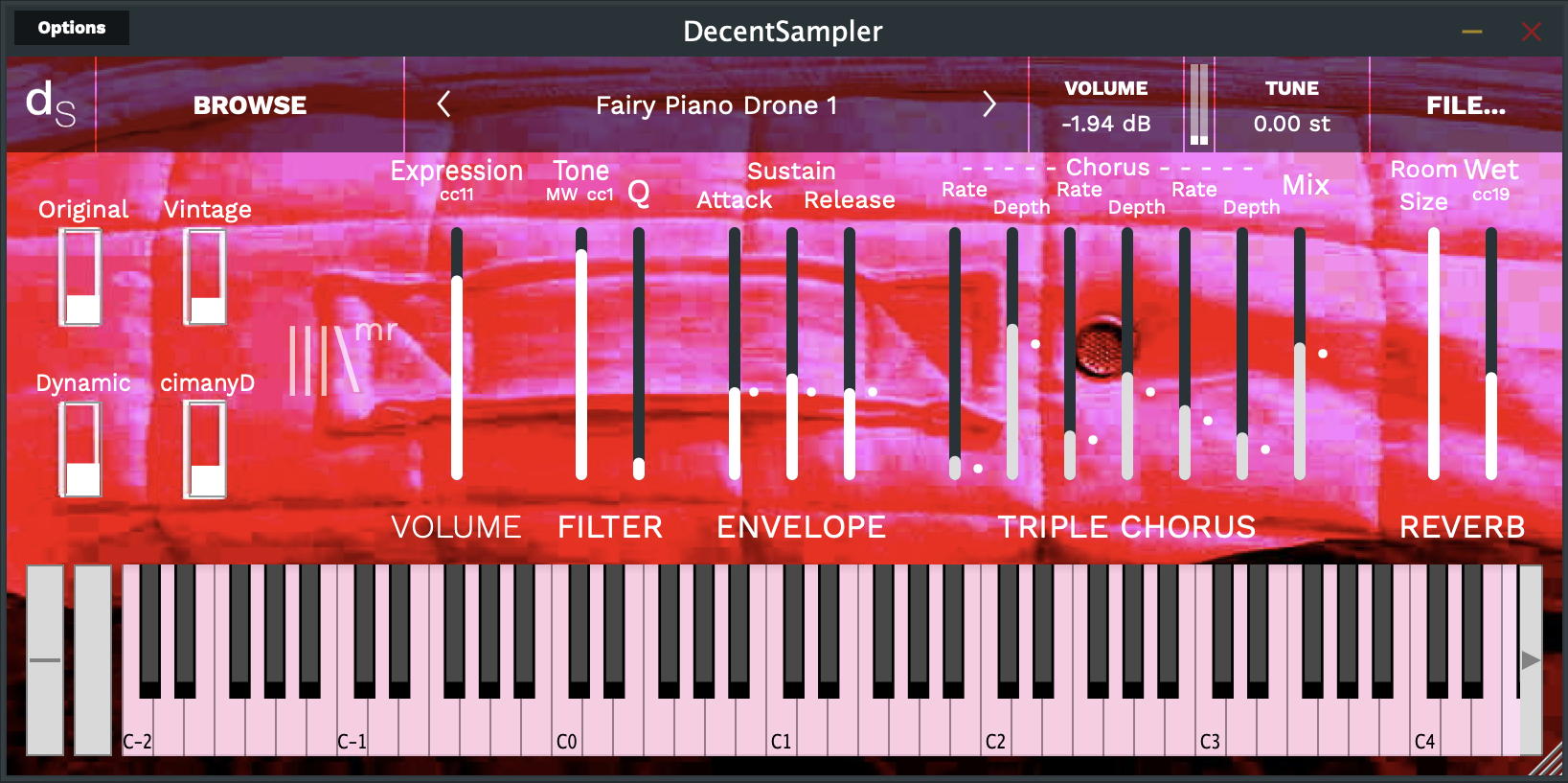
The Fairy Piano Drone User Interface - can you spot the design influence?

Because it makes drone sounds, the percussive, fast attack and slow decay envelope that works for piano, isn't really suitable, so I replaced it with and ASR (Attack-Sustain-Release) envelope, where the attack and decay are linked together. The triple chorus is a step towards the quad chorus used in Deimos Strings - remember that I do everything in little steps...  Anyway, Fairy Piano Drone is a very different instrument to the basic Fairy Piano...

So that's what Extras are all about - remixing, customising, tweaking, and sometimes, completely reworking the user interface, functionality and sound of a sample pack or virtual instrument! 

Now my Fairy Pianos Extras is unusual, because it is me 'remixing' my own sample pack, so it works slightly differently to the more usual case - where another person produces an Extras pack for a samplist's sample pack, so let's look at that scenario first...

How Do Extras Work?

Extras are just ordinary .dspreset files, but made by someone other than the original samplist. They are in an additional folder/directory inside the main sample pack. So for a Decent Sampler sample pack called 'Piano Buck', then the ordinary main folder/directory would look like this:

An ordinary Decent Sample folder/directory...


So there is the 'Piano Buck.dspreset' file, that is used by Decent Sample to define the basic preset for the virtual instrument, the README.txt file, and the two folders: Samples and resources. If this was a Native Instruments Kontakt-compatible folder, then there would be some additional folders and files inside as well, but for clarity, I'm just showing the Decent Sampler files.

For Extras, then you will find an 'Extra' folder/directory inside the main one: 

A Decent Sampler folder/directory with Extras inside

All of the extras are in the '<name> Extras' folder/directory - synthesizerwriter (of course!) in this case. If you get Extras from other people, then this keeps them nice and tidy. Note that the additional presets all end with initials ('sw' for synthesizerwriter in this case). Also notice the two JPEG files - these are the background graphics for Decent Sampler (probably saying something like: 'An Extra from synthesizerwriter'), and you will need to make sure that the 'bgImage=' path in the .dspreset points to that graphics file - it isn't in the resources folder/directory! 

The background graphics are in the same folder as the .dspreset files...

One more thing needs to be done during the development of the Extras presets. You need to add a modification to every path= element in your .dspreset files:

Add ../ to the start of the paths...

Adding '../' to the start of every path (before the Samples/ bit), tells Decent Sampler where to find the samples! This is because the Extras presets are in a sub-folder/directory to the main one, and so the '../' goes up one level and then back into the Samples folder/directory. So an Extras pack contains just the .dspreset files and the background graphics. You can add a README.txt file if you want, although the best place for any information about the presets in the Extras pack is inside the main README.txt file, so all that the samplist needs to do is add the contents of your README.txt to their main README.txt file. 

And that's it. You have made an Extras pack, and people who download it will now have access to all of the new 'Extra' presets!

Permission

The first thing that you need to do if you want to make an Extras pack is to contact the original samplist and ask for permission to use their samples to make a 'derived work'. Yep, that sounds like a legal phrase because it is - the original samplist of the samples owns the copyright on the audio content in those samples, and so it is only polite and proper to get their permission in order for you to use their material. And remember, the samplist needs to add your Extras folder to their download, so they are in control! If they don't like your Extras, then they don't get added to the download...

(For samplists, then they retain final control over what Extras are published, and when, and by whom. Plus, best of all, once a sample pack has been published, then you can upload a new zip file at any time, so the samplist decides when to do an update, when to add Extras, etc. Once the sample pack is published by Pianobook.co.uk, the samplist has control over what is in it.)

If you don't get permission, then don't even start to make an Extras pack - try another samplist!

Inside Fairy Piano Extras

As I said earlier, doing your own Extras is slightly different. It doesn't really make sense to have a separate folder - unless you have very different .dspresets. In the case of Fairy Piano Extras, then the Drone version, the reverse version and the inverse version are all very different, with major changes to the functionality. Luckily, the samples are tiny, and so they can be included, but if the samples were large then this would be a problem and the approach described above would be better.

Special!

So that's Extras. I think they are pretty special! I think they give Pianobook.co.uk new functionality that turns it into something even more interesting...

If you go to The Imperfect Drummer's Pianobook profile page, then you will find his excellent 'Mom's 1974 Baby Grand' sample packs, and if you download the Decent Sampler version, then you will find 12 additional .dspresets - Extras created by me! Enjoy!

One of the Extras for Mom's 1974 Baby Grand...

---

If you find my writing helpful, informative or entertaining, then please consider visiting this link:

Synthesizerwriter's Store (New 'Modular thinking' designs now available!)

Buy me a coffeeBuy me a coffee (Encourage me to write more posts like this one!)... or...

Buy Me a Coffee at ko-fi.com (Encourage me via a different route entirely...)

Or just tell someone else that there's this amazing blog about hi-tech music...


Friday, 1 October 2021

Behind the scenes of the 'Straight Maths' Virtual Instrument on Pianobook.co.uk

I have been exploring the possibilities of mis-using a sample player recently. Dave Hilowitz's excellent 'Decent Sampler' is, imho, not only much better than merely 'decent', but it has also allowed me to go slightly outside the usual territory of samples and to become an intrepid explorer. Huge thanks also to the team behind Pianobook.co.uk - a great contribution to the world of sampling, created by Christian Henson.

So here is a quick recap of the design thinking behind two of my recent releases on Pianobook.co.uk.

Parallel Inversions

'Parallel Inversions' was my first really developed idea that isn't just a sample replay. It deliberately breaks the rules to produce an 'alien' instrument. In a 5 star review, Michael Milburn said; 

'I don’t understand what these are, but do enjoy the sounds.'

The user interface is the first thing that hits people with this virtual instrument. The top row of controls has 23 vertical faders that look a bit like the 'Mic' sliders that you see in many sample players - except that instead of 2 or 3, or maybe 5, or (extreme) 7 or higher, there are almost two dozen of them! They are split into four sections, and there are some subtleties in the way that these are put together.

The most important section is the one that has the 0 to 4 'Mic' sliders in it. The 'Zero' slider is set at about 75% in the default preset, so that you know it is important. This slider plays the 'fundamental' frequency that is played by Decent Sampler, or rather, it plays that frequency sometimes - the XML code that Decent Sampler uses to specify how samples are played allow all sorts of manipulations, and I'm exploiting this here. So the 'Zero' / '0' slider plays three different octaves, using a random 'Round Robin' assignment. So if you play a C3, then you will actually get a C3, or a C4, or a C5. The ratios are set asymmetrically, with the 'octave down' option half the probability of the others. So for every chord that you play, you may get that chord, or you may get a biased inversion of it instead (a 'bass-light' inversion). This isn't how many instruments work! (But it is an 'alien' instrument...)

The 1 to 4 Mic sliders are actually pitched in semitones up from the 0 (zero), which is why they are arranged in the staggered 'piano keyboard' arrangement. This is immediately obvious if you increase the '1' slider, because you get a C / C# discord! So the 0 to 4 section controls parallel pitches, which (again) isn't how many conventional instruments work - organ drawbars are a bit like this, but...).

The next section to the right is from 5 to 11, and again these are parallel semitones up from the 0 (zero) pitch. The '5' (fifth) slider is set at about 75% in the default preset so that you know it is important (just as with the 0 (zero) slider. So the default preset plays two sine waves, a firth apart, and in both cases, the pitches are inverted (or not) at random, with a preference for one octave up instead of down. All of the inverted pitches are slightly detuned relative to the fundamental pitch, which gives a more interesting tone. All of these 'Parallel & Inverted' sliders are centred in the stereo image.

The combination of fixed parallel intervals (the default 5th is just intended as a hint to get you started) and random inversions kind of breaks 'the rules', and gives this instrument an interesting and unusual character. Have fun breaking all those conventions that you are supposed to follow, and embrace performances that are never the same twice!  

On the far left, there is a single '-12' slider, which was supposed to play a pitch one octave down from the fundamental. Unfortunately, I'm not the world's greatest programmer, and so it actually plays the same pitch as the '0' (zero) slider, except that the random inversions mean that most of the time it plays a different octave. Although Parallel inversions has had 3 versions, I have left this defect in there, because serendipitously, it sounds good. 

The A to K sliders are different again. This time they are panned either hard left or hard right, and they are distorted sine waves, instead of the purity of 0 to 11 and -12. So the A to K sliders add timbre and broaden the stereo image. Again, this isn't how normal instruments tend to work, but...

Finally, the lower row has more 'synthesizer'-type controls than is normal, with a full ADSR 'envelope' control, and I recommend the 'Attack' control for giving gravitas, and the 'Decay' control (with 'Sustain' set to near zero) for adding a 'Radiophonic' or synthetic character that sounds like it is from the 1970s. 

Straight Maths

'Straight Maths' has a busy user interface, but it extends some of the ideas in Parallel Inversions. The left hand side has 48 'Mic' sliders (yep, a lot!), whilst the right hand side has the extended 'synthesizer' controls, but in a more compact vertical format.

The three rows on the left are devoted to three different types of sound source. 

S - Top Row - additive synthesis

The top row (S) is sine waves (with twists) to provide simple Fourier additive synthesis. The '0' (zero) slider is again set as a hint that it is the fundamental in the default preset, but it does tend to get lost with all the other sliders! 

The three blocks of four Mic sliders on the top row have, from left to right:

- a Sine wave (0, 1 or 2 octaves up, shown as 0, 1 or 2), panned to the centre,

- a hollow-sounding, slightly square waveform (-), panned to the centre,

- a slightly bright, slightly sawtooth'y waveform (N (get it?)), panned to the centre, and 

- a detuned stereo 'sweetener' sine waveform (s) that adds a bit of interest and broadens the stereo image. If you want, you can ignore the 's' sliders and add your own preferred chorus effect via VST or outboard...

Yes, there's a bug with the 'S' in the two octaves up section, but that's part of the charm of the user interface, and does not affect the tone! 

The '-2' and '-1' mic sliders are sub-octave sine waves that can add low end to sounds. Use with care! 

As with all additive synthesizers, you mix and match the sliders to give you the combination of harmonics that you want, and then use the ADSR controls to give the sound a bit of shape in time. 

M - Middle Row - Karplus-Strong physical modelling

The second row has 16 different samples of metallic-sounding decaying sounds, derived from the Karplus-Strong hammered/plucked string physical model. '13' is my personal favourite, but it is way too strident for most purposes, and so just the merest hint of it is usually plenty! I resisted the temptation to arrange the sliders in any sort of order (previously I tried a 'tone-to-noise' arrangement), mainly because when I have tried to do this, I have rediscovered just how difficult it is to arrange multi-dimensional differences into a linear order. So I'm afraid that you will just need to play with the sliders until you get used to the sounds. Oh, and 10 and 11 ARE different, but not as different as I wanted! 

The 16 sliders are all tuned slightly differently, and are all stereo. This means that you can use combinations to add harmonics and detuning

My preference is to use the middle row to add a little bit of metallic 'bite' to sounds that are mainly top-row additive at their core. You can completely ignore this and do your own thing, of course!

W- Lower Row - Risset physical modelling

This row mis-uses Risset's work on synthesizing drum sounds, and adapts it to producing 'woody' sounding fast-decaying thumps and clunks to add percussive starts to the higher row sounds. There are four sets of sounds, arranged with the left-most sound in each set being the thickest (three sounds at once) and the others just single sounds. The detuning is toned back for most of these samples. These sounds are in mono, centered in the stereo image. I did play with stereo samples, but at low frequencies there isn't much to gain. To show how self-contradictory I can be, my '9126 Sawtooths' instrument on Pianobook.co.uk has way too much stereo bass!

It is quite fascinating how just a brief 'blip' of woodiness at the start of a sound that is all sine waves can totally change the character and timbre that you perceive. (Oh, and too much reverb is always a good idea!) This low row is influenced by the clicks found in old tone-wheel organs (the idea of adding percussive starts is not 'new' in any way!) and by the rather novel use of samples of the starts of instruments that Roland used in their D-50 synthesizer to augment a simpler digital synthesis technique for the sustained sounds. Roland called this mix of samples and synthesis 'Linear Arithmetic', so 'Straight Maths' is my way of paying homage to a classic 'personal favourite' synthesizer from the 80s. Okay, so now you know where the name comes from!

As before, the lowest row is used to add a little extra bit of character to the sound. The default preset  deliberately adds too much 'W' so that your first experience of 'Straight Maths' is 'Wow!'. Maybe that what the 'W' really stands for? But remember that subtlety is often the best approach, and too much 'W' may take you into cheesy territory...

Trivia

The rows were going to be labelled as: J, AK and C, for Joseph, Alexander, Kevin and Claude, but I thought this might be too obscure. What is interesting is that you now know a famous 'Kevin' - although Karplus still sounds uber-cool to me!

Letiti gave 'Straight Maths' a 5 star review, which is much appreciated, including this comment:

'One of the most innovative and unusual Pianobook entries'

For which I am enormously grateful!

---

If you find my writing helpful, informative or entertaining, then please consider visiting this link:


Synthesizerwriter's Store (New 'Modular thinking' designs now available!)

Buy me a coffeeBuy me a coffee (Encourage me to write more posts like this one!)


Tuesday, 3 August 2021

What is 'Bathroom Door'?

I have gradually been ascending the learning curve for the amazing Decent Sampler, from the multi-talented composer, musician and programmer: Dave Hilowitz ( @dhilowitz ). My most recent Virtual Instrument published on Christian Henson's Pianobook.co.uk is called 'Bathroom Door', and it looks like this:

The 'Bathroom Door' virtual instrument in Decent Sampler

There's quite a lot going on there, so this blog post is effectively going to be the User Manual for it.

Bathroom Door

The name comes from a squeaky handle on the bathroom door, which is probably disappointingly mundane. I captured this (at some stage I really must get a Zoom recorder, but until then I'm using a modified mobile phone to implement a trick that I discovered back in the 1970s...) in stereo and then did some processing in Audacity. Yes, Audacity, and you can see why here - I am rarely impressed by media over-reactions, and the world does seem to now be driven by a huge amount of almost always unwarranted outrage. Also, that computer isn't connected to the InterWeb, and only gets updates of data via USB memory sticks (with some automatic scanning and stuff...).

Processing of audio falls into a small number of types, in my personal categorisation schema. There are the basic tools, like Audacity, then 'Plug-In' hosting tools, like Element (et al) and DAWs, which let you use VSTs and other plug-ins, and then there are the high-end editors, processors, repairers and even mastering tools, like DSP-Quattro, Pro Tools, iZotope RX8 and many more. I have example applications from each of these main categories, and I try to avoid too much duplication of functionality... But Audacity is home to some of my Nyquist plug-ins, and I really must get around to updating them to the latest version of Nyquist...

Anyway, the basic technique that I use for processing samples tends to be noise reduction, followed by Paulstretching or granular processing, looping (usually long cross-fades), and probably too much normalisation.  Actually, a lot of the major 'processing' happens inside Decent Sampler...

The User Interface

I am happy to admit that before I started using Native Instruments' Kontakt, and in particular, the Spitfire Audio sample libraries, I wasn't very familiar with the idea of 'Mic' sliders or mixers. I learned synthesis on real analogue, dual VCO, 'Moog' ladder-type VCF monosynths, where the source mixing was limited to the two VCOs and the noise source. So all of the top row of 'Bathroom Door', and the left hand side of the second row, wouldn't have made much sense to me. I was never a fan of the ARP Pro-Soloist type of UI whert you had a row of switches to select a sound, and I know that it was popular back in the late 70s. 

Now that I have spent more time programming virtual instruments, I'm beginning to see some of the appeal of having direct control over the sounds from many sources. Compared to the usual 'subtractive synth' technique of 'fix it with processing', this is the exact opposite (and more akin to mixing) - 'start with the right sources'. 

The Top Row Mic Sliders 


This is where you mix the main sources of tone and timbre. From left to right, you have Tones, then Clicks in the middle, then Noise on the right. 

[ Tone ]

On the left, the 'Tone' set of mic sliders are the pitched 'melodic' part of the final sound, and the main part of the pitched timbre - Feel free to mix the four sounds - these are not ON/Off buttons for a reason! 

[ Noise ]

On the right, the 'Noise' set of mic sliders are there to provide background 'fill', and this can affect the perceived timbre quite a lot. There's a fascinating psycho-acoustic phenomenon where your ears will assume that noise in a sound must be associated with the pitched portions of it, and will associate the two together. If you add noise to sawtooth 'string' sounds, then the strings sound brighter - and kind of less synthetic / more realistic! So don't be afraid to try mixing in a little bit of grit, dort, grundge...noise.

[ Clicks ]

In the middle, the 'Clicks' set of mic sliders are quasi-rhythmic loops of background textures that give a sort of 'evolving or moving' pad feel to the overall sound. As is often the case with this type of 'extra' element to a sound, you do not need very much volume to get the right balance of pitched sound and supporting movement. These definitely are not intended to be the loudest and most obvious part of the final sound! Subtlety is your friend here. 

The Extra Mic Sliders


On the second row, are five extra mic sliders. These are just little bits of extra tonality to add a bit of spice to the main 'top row' mic sliders. 

[ Detune ]

The 'Detune' set of mic sliders are just deliberately detuned versions of the 4 'Tone' sliders that are directly above them vertically. One obvious thing to do is to just raise the same Detune mic slider as the main Tone mic slider that you have above it. But there are no rules! - There's nothing to stop you using different Detunes to your Tones!

[ Fab ] 

Just a little bit of fun, this is the exact opposite of putting effects after a synth or sampler - it puts a phasing effect into the source mix! The phaser is deliberately 1970s in feel, and can either add a little bit of subtle movement to the final timbre, or can be over-used to swamp the sound in washiness. Or places in between - you choose.

The Processors


There's always a temptation to add too many processors. More rotary controls is better, yes?

But sometimes, less is more. This isn't meant to be a full synthesizer - note the name: Decent Sampler. (Not 'Decent Synthesizer'!) And samplers have different UI design rules - lots of controls are definitely too many. So I've deliberately kept to a minimalistic set: 

Attack and Release to control the start and end of notes (and slow versus fast 'Attack' settings can change the feel of a sound quite remarkably, which is often overlooked in a world full of patches with appealing names...).  

Tone (Low-pass filter cutoff frequency) and Q (Resonance) for setting the brightness of the sound, or rolling the top end off. The cutoff frequency is mapped to the Mod Wheel and MIDI CC 1 as well. I'm still trying to get my head around the <midi> section of Decent Sampler's .dspreset XML file, and so Expression (CC 11) and other MIDI controllers are still in the pipeline for a future version. 

Size and Reverb complete the processing section. Room size is an interesting control - just about everyone starts out with it on biggest, and gradually learns that smaller can be better, depending on the timbre. The Reverb rotary control is the Wet/Dry mix (Do not put a string reverb into water!) and again suffers from the 'more must be better' syndrome. This is only true in Demos and (maybe) in Christian Henson YouTube videos! 

Using It

'Bathroom Door' isn't a 'single sound' type of virtual instrument. It can provide unusual leads for melodies or counterpoints, as well as background pads, plus there's a lot of scope for atmospheric fills and effects. It got a 5 Star review on Pianobook.co.uk where the reviewer seemed to like it, and said that it was well suited to Pierre Henri material and ambient music.

Getting It

'Bathroom Door' can be downloaded, for free, from Pianobook.co.uk

---

If you find my writing helpful, informative or entertaining, then please consider visiting this link:

Synthesizerwriter's Store (New 'Modular thinking' designs now available!)

Buy me a coffeeBuy me a coffee (Encourage me to write more posts like this one!)
