
Showing posts with label MaxForLive. Show all posts

Saturday, 4 June 2022

Outreach - What I try to do for education...

Yep, I do other things! This blog is only part of my outreach activities...

Synthesizerwriter at the Suffolk Show 2022 (The badge is deliberate - the 2020 and 2021 shows didn't happen for some reason...)

For the last day of May, and the first day of June, 2022 (that's the 31st of May and the 1st of June, just to be sure...), I was at the Suffolk Show, on the 'Innovation Martlesham' technology innovation stand (huge thanks to BT (the telco, not Brian Transeau)), trying to inspire young minds to take up a career in technology. My aim was to get kids to think about sound in a different way, and so I had a ‘3D Sound Box’ interactive exhibit, where you put your hands into a box, moved a controller around, and put some headphones on (with other people listening in on other headphones (parents, siblings, etc.)). As you moved the controller, the sound changed in subtle and complex ways, and the reaction was uniformly amazing - eyes opened wide, smiles appeared on faces, and parents ended up dragging the kids away some time later. ‘Cool!’ was the standard comment.

People totally comprehended that when you moved the controller so that it pointed in a particular direction, you get a particular sound, and that you could blend from one sound to another by moving the controller to another position. Several people said that they were expecting just a few sounds and a simple mix between them, and they were not expecting a complex morphing from one sound to another...

Behind the scenes, a DJ Tech Tools MIDI Fighter 3D provided the position controller, with two additional infra-red position sensors providing Left-Right and Backwards/Forwards control. The position vectors were fed into Ableton Live, where a custom MaxForLive script changed the rather strange outputs into more understandable controls suitable for controlling parameters (The MIDI Fighter 3D is designed for finger drumming!). These parameters were then used to control the positioning of the four source units in the convolution triangle in Phobos from Spitfire Audio (and BT, (Brian this time!)!) (I use a lot of stuff from Spitfire Audio!). Ableton was sending a C3 drone note to Phobos, and it was set up to produce very different sounds for each of the extreme positions, with Ableton also adding a controlled low pass filter on one axis. The output of Phobos was then tweaked further, ending up in the Envelop Spatial audio plug-in, and the final audio was delivered to stereo headphones using binaural processing. The convolution synthesis in Phobos was a key part of making this different to ‘four sounds in space that you mix between’ - which is what was apparently expected. (A couple of people wanted the standard ’sound rotating around your head’ binaural demo, so I had a Live Set for that as well!)

The MIDI Fighter 3D

The DJ Tech Tools MIDI Fighter 3D MIDI Controller

The MIDI Fighter 3D is a finger drumming MIDI controller that has 16 expensive, high quality, 'arcade-console' style buttons/switches that are designed for long life and consistent operation in punishing situations - several millions of pushes (5 million+ in this case). Elektron have similar switches on their gear where the buttons are going to be 'mashed' a lot in normal use. In contrast, ordinary 'click' switches are small, very low cost, and are made of a metal dome that collapses when you press it, and have a life of a few tens of thousands of clicks for the cheapest, with over a hundred thousand clicks for the more expensive versions. 

(The rubbery buttons that you find on a lot of gear are called membrane switches, and here the flexible bit deforms when you press it, which pushes a piece of conductive plastic (containing lots of carbon, so it looks black) onto a printed circuit board, and so makes a connection. These are very low cost, are easy to light up with LEDs, and are easy to replace (you just replace the sheet of flexible stuff and all those little blobs of conductive plastic), which is a good thing because they can wear out with a lot of use, and they don't like dust or ash or powders, and they are not very consistent in operation - you know how some of them can deform is strange ways, and sometimes get stuck? As for computer keyboard switches, then that's a whole topic all to itself!)

But this isn't a blog on switches! What the MIDI Fighter 3D also has, and the reason for the '3D' part of the name, is a 3D accelerometer which can detect movement on 3 axes: x, y and z. There are several modes of operation, but the one I used was the 'Edge Tilt' mode.In this mode, if you tilt the MIDI Fighter 3D, then it outputs MIDI Continuous Controller / Control Change (CC) messages that indicate how much it has been tilted relative to each of the four bottom edges. 

Rotation on the right hand edge...

So for the right hand edge, CC0 (zero) outputs a value of 0 (zero) when the MIDI Fighter 3D is horizontal (on a table, for example), and 127 when rotated clockwise by 90 degrees, so it is vertical.

Rotation on the left hand edge...

The left hand edge is similar, except that this time it is CC2, and it is anti-clockwise rotation that outputs a value of 0 (zero) when horizontal, and 127 when vertical. There is a small 'dead zone' (settable in the Utility software (Mac and Windows) that lets you set a range where small tilts from the horizontal do not output CC messages. 

For finger drumming applications, where you place the MIDI Fighter 3D on a surface and tap the buttons, then tilting the box along one of the edges feel very natural, and the box has rounded rubber feet that make this very easy to accomplish. But if you pick up the MIDI Fighter 3D, then you can tilt it in any direction, and so having the edges as the reference points doesn't make much sense. Also, you can tilt it either way because there isn't any surface getting in the way. There isn't a 'free space' mode, although there is a mode where you can also detect rotation, but that requires you to press a button each time you want to know what the orientation of the MIDI Fighter 3D is... 

So, I wrote a little utility, in MaxForLive, that takes the CC messages, and processes them so that when you hold it in your hands instead of being on a surface, then it combines the 4 controller messages (CC0, 1, 2, and 3) so that they are combined into just a pair of messages where you can go from vertical, through horizontal and back to vertical again with a single continuous clock-wise (or anti-clockwise) movement, and the result is a 'Composite' controller message that goes from o to 127 (with a small 'dead zone' as it goes through horizontal). This works for left and right, as well as forward and backwards, so you get two composite controllers.

A Composite CC made up of CC0 and CC2 (or 1 and 3)

The 'inverse' composite controllers are also output from the Utility, so you get pairs of CC messages that go from 0-127, and 127-0, simultaneously, depending on how much you have tilted the MIDI Fighter 3D away from the horizontal. Not only does this feel 'right' when you hold it in your hands, but it allows you to control two different parameters as if the MIDI Fighter 3D was a cross-fader - but one that works in two dimensions instead of just one. 

The MIDIccTWEAK Utility written in MaxForLive...

The MaxForLive Utility, MIDIccTWEAK, will work with any source of CC messages, and provides offset and gain control, plus inversion for the basic CC messages, then the paired 'composite' controllers, and finally paired 'composite' controllers using the 'other' pairing - for this application, it uses position sensors at 90 degrees to each other, instead of being on opposite sides of the MIDI Fighter 3D. That's 12 mappable outputs from the four CC sources. 
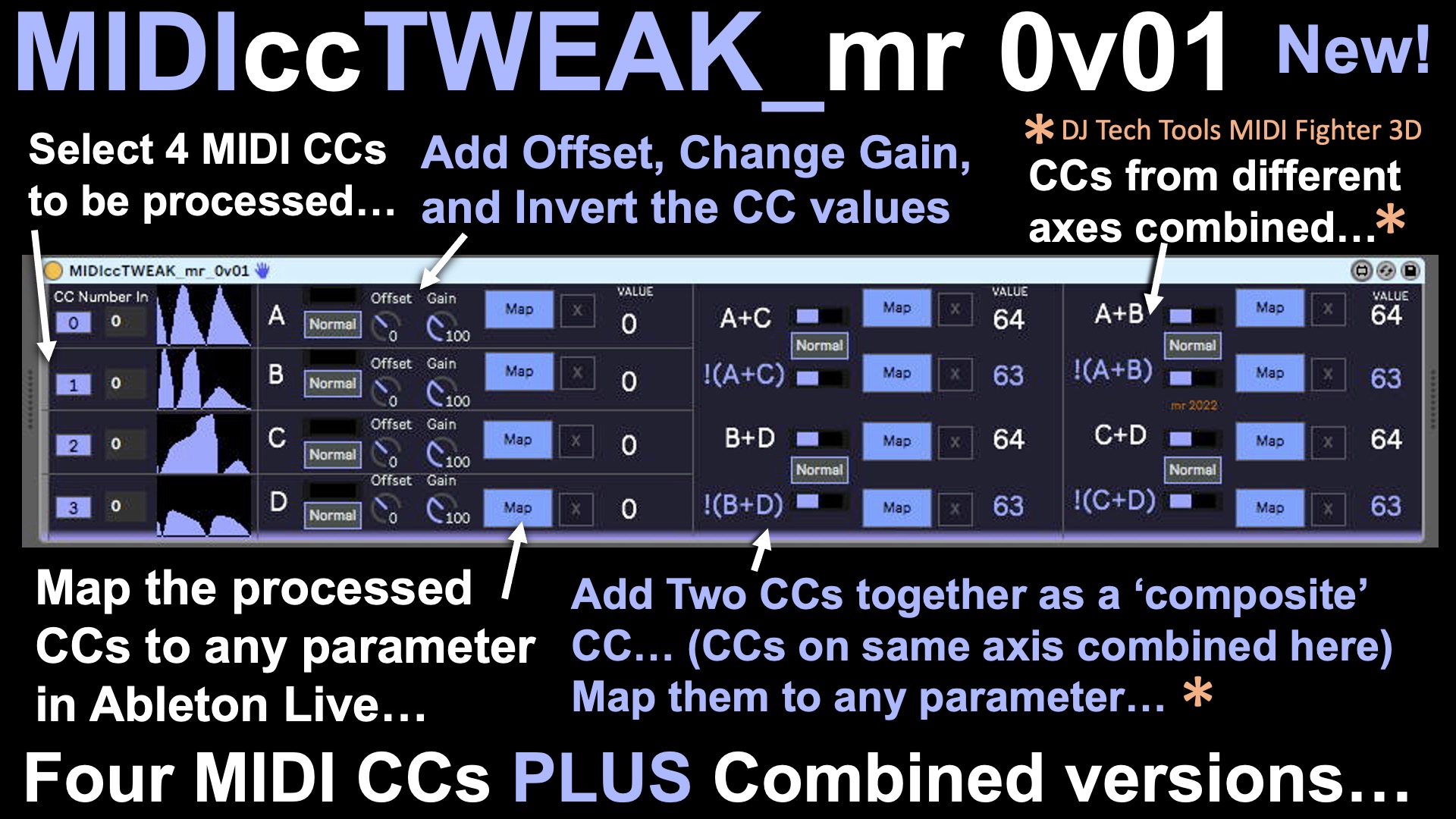
What can the MIDIccTWEAK Utility do?

The MIDIccTWEAK Utility can be downloaded from MaxForLive.com...

Inside the M4L code...

A couple of interesting things came up whilst programming MIDIccTWEAK, although neither of them are clever or unusual, which is usually when I include more details. Nope, in this case it was an interesting option and a potential trap for the unwary. Here's a fragment of the M4L code:
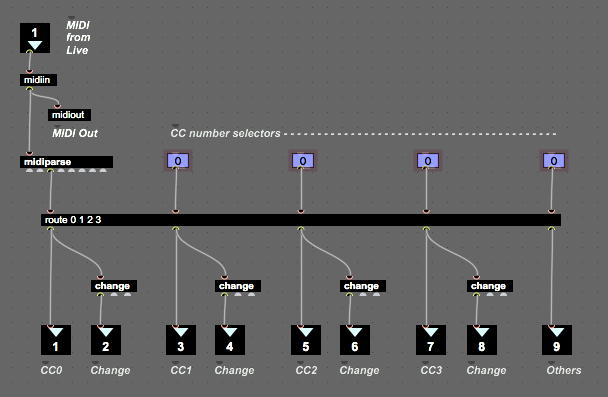
Part of the M4L 'code' for MIDIccTWEAK...

Now, most of this is perfectly ordinary: a MIDI In (...and an Out to provide a 'Thru' to the next MIDI device in the chain...), a MIDI Parse object to decode the MIDI messages, and a Route object to extract just the MIDI CCs that we are interested in. But note those 'change' objects - this was me testing out an idea to try to ensure that the MIDI bandwidth consumed by Controllers was minimised. The 'change' object filters out any repetitions of the same number, and so this code was imported from a prototype M4L device where I was monitoring several MIDI Controller hardware devices to see what their outputs looked like... 

I was expecting to see some repetitions of the same controller value in the Controller Messages, and yes, I know that the alternative name for Continuous Controller messages is 'Control Change' messages, but I was still curious to see what actually happened. It turns out that everything that I looked at sent streams of messages of changes to MIDI Control values, and even when the faders, rotary controls, levers, and other physical controls where moved very slowly, then repetitions were still filtered out just about all of the time. In the past, I have seen at least one Mod Wheel where careful positioning of the wheel would produce continuous messages with two slightly different values, but not recently. I have talked about this before in this blog, but it is always interesting to see just what the difference in values (the 'delta') is in reality. Theoretically, it should be one, but this uses lots of MIDI bandwidth, and rapid changes of controller value are going to create long streams of controller messages that will just clog things up. So a more sensible approach would be to send controller messages at fixed intervals of time, so that there is lots of detail for slow movements, and less detail for fast movements. I suspect there is a 'rule of thumb' set of values for timing, but I have never done deep enough research into this. let me know if you want me to revisit MIDI Controllers and look at this aspect of them. 

What ought to be useful about the 'route' object is the final output, where any messages that don't match a CC number are dumped - an 'else' or 'other' or 'default' output (it depends on which programming languages you are familiar with!). But I haven't ever needed a 'Controllers you haven't selected' detector. I suppose you could use it to look for unusual activity from controller numbers that shouldn't be outputting anything, but it just seems to be something that should have a use, but I haven't stumbled across it yet.

More interesting, and not restricted to only this M4L object, is a potential trap for then unwary. Look at the right most input and output - at the top, you have the number box for selecting which controller the 'route' object should be matching, and underneath, you have the 'Other' output, for when no Controller number message matches the specified numbers. Whoa! 

A potential trap for the unwary...

Actually, those number boxes, which control the matches that appear at the outputs, are offset by one horizontally - to the left (because of the input on the top of the 'route' object). The second input determines what comes out of the first output of the 'route' object, and so on across the object. Lots of MaxForLive object are like this, when you look for it, and it is one of the things that you need to watch out for, especially when you extend object boxes very wide, as here (or wider!), so that you can keep all of the parallel output paths nest and tidy. If the left hand edge is off-screen, and you only look at the right hand edge, then the number box looks like it ought to be controlling the output underneath it - so the implied connection inside the yellow circle is not correct!

The MIDIccTWEAK Utility can be downloaded from MaxForLive.com...

Multiple controls

Inside the '3D Sound Box' used in the interactive exhibit, there are additional infra-red position sensors that are used to detect side-side movement (used to control left-right panning), and vertical (up/down) movement (used to control the overall tone of the audio), so there are at least four separate independent ways that you can control things just by picking up the MIDI Fighter 3D and moving it around inside the box.

The 3D Sound Box...

You can just see the MIDI Fighter 3D resting on the raised floor of the 3D Sound Box in the photo above. 

Sound Generation

There was quite a lot of sound design behind the sounds that were produced. I wanted something subtle, sophisticated and very controllable, and I definitely didn't want to have a 'sound going round your head'-type of binaural demonstration, because those have always felt gimmicky and not very real world - I can't recall a real musical performance where position was that important or centre stage, with the exception of Tim Souster's 0dB concert at the Royal Northern College of Music in Manchester, in the late 1970s (and I was there!), where there was a lot of performing 'in the round'...

Instead, I chose a drone sound, and mapped the MIDI Fighter and the up/down sensor to changing the timbre of that sound. I used the Spitfire Audio / BT 'Phobos' polyconvolution synthesis virtual instrument to generate the sounds, inside Ableton Live. Four Source Units provided the inputs to three convolution synthesizers, with the controllers moving the four sources around in the convolution triangle. I also added a filter control so that anti-clockwise rotation changed the cut-off frequency of a low-pass filter (a cliche, I know, but it was very popular!), and added in some percussive sounds when the controller was tilted all the way backwards. All in all, there were lots of different timbres and smooth blends between them as you moved the MIDI Fighter 3D around inside the box.

I added a little bit of reverb to provide additional spatialisation, and then passed the various audio outputs into the headphones via Envelop binaural plug-ins. I used a Studiospares HAR-60 six channel headphone amplifier to drive six pairs of headphones - and Studiospares gave me an amazing deal for buying Mackie closed-back headphones in bulk!

People rapidly got how it worked! There's something about moving your hands making a sound change that activates a kinetic spatial memory thingy inside your head, and when the changes are complex and involving, then you get lost inside the soundscape. In a world where people don't seem to listen hard to music any longer, it was amazing to see people concentrating on what they were hearing. one pair of headphones was used by the 'driver', whilst the other headphones allowed other people (parents, friends, etc.) to listen in. In many cases, passive listening resulted in them wanting to 'have a go' as well!

Talking to parents, they were expecting 120 bpm, 4/4 EDM, and were totally surprised that someone would instead demonstrate something which was subtle, deep, sophisticated and sounded high quality - I explained that the core of the sound came from one of the top sample library companies in the world… So the sound design that I did worked very nicely. Kids (and their parents) loved the exhibit - one family said that it was the best thing they had seen (heard!) all day! 

Outreach

The success of an interactive exhibit like this is about reaction at the time, and then about follow ups. In the two days, I got huge numbers of smiles ('This is the first time I've seen a smile like that for ages!' was one parent's comment...) and a universal 'Cool!' reaction from just about everyone, especially young kids. I have been invited to schools to do more demos, asked by a local media group if I would be interesting in a collaboration, and the local university is also interested in talking to me more about this type of interaction and how to programme it. 

So, my grateful thanks to Spitfire Audio and BT for Phobos, because it was a key part of a very successful exhibit that may well have influenced more than 100 young minds into thinking about sound in a different way. Also thanks to Ableton for Live, and especially MaxForLive, a toolkit that I use all the time! Thanks to the amazing guys at DJ Tech Tools for their MIDI Fighter 3D controller. Thanks to Studiospares for a beautifully thought-out headphone amplifier. And finally, thanks to Envelop for making spatial audio so accessible in Ableton Live! Oh, and thanks again to BT (the telco) and Innovation Martlesham for making this all possible!

---

If you find my writing helpful, informative or entertaining, then please consider visiting this link:

Synthesizerwriter's Store (New 'Modular thinking' designs now available!)

Buy me a coffeeBuy me a coffee (Encourage me to write more posts like this one!)... or...

Buy Me a Coffee at ko-fi.com (Encourage me via a different route entirely...)

Or just tell someone else that there's this amazing blog about hi-tech music...


Saturday, 17 July 2021

A Doubly Virtual Talk...

I recently gave a talk to my local tech network. You.know, those things that used to be get-togethers and networking events for tech people, entrepreneurs, start-up people, innovators, inventors, etc., and that people discovered you could do using Zoom during the pandemic. And they obviously work, because we are still doing them.

Anyways, a casual comment I made at one of these tech chats turned into a talk about one of the things that I do, inspired by by soundtrack entry in the famous Westworld competition organised by Spitfire Audio a couple of years ago. It seems that there's a lot of interest in how current technology can make working with audio and music a lot easier than it was in the previous century, and so I just basically did a bit of show and tell...

Remember 'big presentations? Photo by Sigmund on Unsplash

Now when I say 'show and tell', I do mean exactly that. I never wanted to do yet another boring slide presentation full of slides with bullet points. But just watching someone share their screen for an hour is also not so great - I've been in quite a few zoom calls where person after person shared their screen and worked on software, and after watching someone else tweaking MaxForLive for a while, you kind of want to do some programming yourself. Probably my least favourite calls have been the ones where a series of musicians talk for about 30 seconds on some of their techniques, and then spend 20 minutes doing DAWless improvisation. It's the inevitability of it - you get 30 seconds of interesting information, and just when you start to learn about a technique that might be useful, they say: '...and here's a track I put together using a different approach...'. Cue 20 minutes of doodling...

So, no slides, no bullet points, and not too much boring screen sharing. It's a challenging recipe. So I used online videos (mostly YouTube, although I subscribe to Nebula and love it, but YouTube has the advantage of being accessible (and I'm struggling to think of any other advantage...)), web-pages instead of photos 'from the internet', and yes, some screen sharing where I avoided any code and concentrated on showing interactive arranging stuff. 

At the end of it, I thought that I should capture it, so that others could have a similar experience, and so the rest of this blog is just the resources that I used, minus the potentially boring screen sharing where I probably droned on about doing music for pictures. So you get just the good stuff to browse through as you wish, and that's all upside, as far as I can tell... 

(When I type: 'Just the good stuff', there's a caveat, but you probably know that already - you have to wade through me adding all of these explanatory words. Unless you just ignore my words and click on the videos, of course...)

"And now, over to Martin..." <screen goes black>

Resources...

To set the scene, I used an opening music clip - 'Journey across the Red Planet', an excellent piece of music from Paul Thomson, which demonstrates some of the sounds from the Spitfire Audio 'Abbey One library. (Paul is one of the two founders of Spitfire Audio, a cutting-edge UK ‘sample library’ company: https://www.spitfireaudio.com ) I explained that 'everything you are hearing is produced by a computer, using recordings of real instruments'.

I suggested that they should close their eyes for a minute or so, listen(!), then open them and look for the connections between what was happening on the screen and what they could hear. The video shows a DAW (Logic) playing the music, and so you can get some sense of how a DAW uses lots of individual tracks of virtual instruments to reproduce music, and there were piano rolls and MIDI Controller editing shots that illustrate that there's a lot of fine detailed control. Overall, the linkage between the music and the video is pretty effectively shown, but then Spitfire Audio do make vey good videos. So, yes, I started with virtually an advert for Spitfire Audio, but then I do have quite a few of their libraries, LABS instruments and a lot of the associated Pianobook.co.uk instruments, so I'm slightly biased. If you've read this blog for any time, then you will have seen that I've been to various events at their HQ (back before Pan Demic and her band put the world on pause for a while...) and I've met Christian Henson and Paul Thomson... (But do they remember me?)

Anyways, the music and the video serve as that all-important bridge, where you leave the real world, and enter the artificial world of 'the talk'. I've never liked the idea that putting up a slide that shows the title of your talk, followed by another slide that tells your life achievements in bullet points, is the perfect way to move people out of their default mind-set and into one where they are ready for fully engaging in a presentation. Closing your eyes and listening helps too, and it often puts any older members of the audience to sleep, so they can't ask tricky questions about DIN sync in the 1970s.

Anyways, I introduced virtual instruments, and how they replayed recordings of real instruments. Or unreal instruments, and so I showed them my BankOSC MaxForLive device that makes 32-oscillator drones and sweep sounds, and basically makes it sound like you have a humungous hardware modular synth, when actually you must have Ableton Live and a free bit of software that I published on MaxForLive.com.


I explained that quite a lot of the non-orchestral sounds that I used in my Westworld competition entry were produced using BankOSC, and I then talked very briefly about MaxForLive, and then Ableton Live.

I've already mentioned adverts, so you won't be surprised that I told them they could read more about the sound generator in my blog:

BankOSC

I found some good links that explain MaxForLive and Ableton Live, curiously made by Ableton themselves:

MaxForLive 

Ableton Live 

I explained that there are many types of software applications for working with audio, but the terminology that they will probably often hear in music technology circles is ‘DAW’ which stands for Digital Audio Workstation. I said that a DAW is a general purpose music composition and arranging tool that works a bit like a multi-track tape recorder – which is what used to be used in recording studios in the 80s…  I'm quite sure that some of the audience had no idea what a multi-track tape recorder was, whilst some others were probably reminiscing about the 80s and remembering 'Duran Duran' music videos...

For comparison with how you might generate that sort of 'big oscillator' sound in hardware, I should have introduced one of the leading lights of the YouTube ‘Synthesizer’ community, giving an introduction to the vast world of hardware modular synthesis:


But I have the advantage of being able to incorporate it seamlessly here, and no-one will know the difference.

I quickly introduced more relevant terminology in a bot more depth:

Sample Libraries 

(Collections of pre-recorded sounds, where each note that a musical instrument can produce has been captured by a computer, whilst playing it in various ways: soft to loud, different intonations and playing techniques, etc.)


Virtual Instrument 

(The software that plays the sounds of a musical instrument in a sound library.)


And finally, I got to the Westworld competition – where the task was to score a short excerpt from Season 3 of the TV series.


I mentioned my entry:


And I mentioned the winner:


I then revealed that if they were intrigued by just how accessible making music on a computer can be, then a good starting point is an orchestral library (Because the results are probably going to impress parents, friends, colleagues, maybe even ordinary people!) – and some of them are free:


Okay, so I mentioned another free (or low cost) Spitfire Audio product. But I bought Discover, and I like it. There are other free (and non-free) orchestral libraries, of course. 

I closed by reminding them that, whilst laptops (and other computers) may be busy making a lot of music, orchestras are also very occupied doing live tours (often of music produced by computers), making sample libraries - and just making music. And let's hope that as the world learns to live with Covid, 'music' and 'live' and 'performance' can happen in the same sentence once again. 

And that's it. A virtual presentation, made from other virtual presentations. This may be the future...

---

If you find my writing helpful, informative or entertaining, then please consider visiting this link:

Synthesizerwriter's Store (New 'Modular thinking' designs now available!)

Buy me a coffeeBuy me a coffee (Encourage me to write more posts like this one!)


Tuesday, 30 March 2021

MIDI Pitch Bend - A Tiny Inconsistency

Sometimes 'The Bears' really are lurking, ready to get you if you step on the cracks between the paving stones... 

One of the things that has been beaten into me, over many years of working with hardware, firmware and software, is a rule that has many forms, but which boils down to something like:

"Question everything. Measure everything at least twice. Always ask: 'Why?"

It is an expanded version of the 'Never Assume Anything' rule. It has served me well. But you must never let your guard down...

Ever...

Photo by Synthesizerwriter

The MIDI Pitch Bend Inconsistency

As with all unexpected things, it crept up on me silently, unannounced, from a direction I wasn't expecting. When you have spent a long time with something, then you think you know about it. Since I got my first copy of the original MIDI Specification back in the mid 1990s, then I have read it carefully and repeatedly. I spotted some of the things that were put in there by knowledgable hardware people who really knew their stuff, like what a MIDI Clock message actually looks like 'on the wire' of a 5-pin DIN cable, and why it was defined like that. And since you are now intrigued, I'm going to leave that until another post...

So the original MIDI Specification 1.0 (1996) has a section for Channel Voice MIDI Messages, starting with Note On (0x8n in modern formatting, but shown in mid 90's style as 8nH, where 'H' means Hexadecimal and 'n' is the MIDI channel (0x00-00xF or 00H-0FH for 1-16)), then Note Off (0x9n, 9nH), through to Pitch Bend (0xEn, EnH). After that you have the System Common MIDI Messages, which all start with '0xF'. So all of the 'highest bit set' values are specified, from 0x9 to 0xF.

The Pitch Bend message is the last of the Channel Voice messages to be specified, and the specification  contains just two paragraphs - the second of which is just two sentences and is just clarification about sensitivity. Here's that first paragraph:  

This function is a special purpose pitch change controller, and messages are always sent with 14 bit resolution (2 bytes). In contrast to other MIDI functions, which may send either the LSB or MSB, the Pitch Bender message is always transmitted with both data bytes. This takes into account human hearing which is particularly sensitive to pitch changes. The Pitch Bend Change message consists of 3 bytes when the leading status byte is also transmitted. The maximum negative swing is achieved with data byte values of 00, 00. The center (no effect) position is achieved with data byte values of 00, 64 (00H, 40H). The maximum positive swing is achieved with data byte values of 127, 127 (7FH, 7FH).

There are quite a few important take-aways in this paragraph. Firstly: Pitch Bend messages are ALWAYS 14 bit resolution. Now I've done quite a lot of Max and MaxForLive devices, and Max is a very useful general purpose tool for exploring MIDI... In Max, there are two basic objects that are used specifically for receiving Pitch Bend messages (there are other, more generic MIDI 'parsing' objects...): 'bendin' and 'xbendin'. 'bendin' is the 'basic' object, and it returns 7-bit values for pitch bend of 0-127 (a single MIDI data byte), whilst 'xbendin' is the 'extra precision' object, and it returns 14-bit values from 0-16,383 (two MIDI data bytes)). 

7-bit and 14-bit Pitch Bend objects in Max

The next important thing here is that the 'bendin' object is throwing away the second byte, the Least Significant Byte (LSB), so the values that you get are just the raw 7-bit values (0-127) that are in the Most Significant Byte (MSB). As I'm sure you know already, individual MIDI 'bytes' only have 7 bits available for data, which is why the value doesn't have the range of 0-255. You need multiple MIDI 'bytes' in a message to get extra resolution. In the 14-bit-oriented way that MIDI represents higher resolution numbers, then for a value represented with two 'bytes', the MSB is the top 7 bits, and the LSB is the bottom 7 bits. So the range covered by the LSB is from 0x0000 to 0x007F (0 to 127) in steps of 1, whilst the MSB is from 0x0000 to 0x3FFF, in steps of 128. Now 0x3FFF is 16,383, so that's where the full MIDI Pitch Bend resolution of 0-16,383 comes from.

Note. I need to point out that Pitch Bend messages, by design, should include 14-bit 'extra precision' values - as noted by the MIDI Specification - because pitch bend is a 'special purpose' controller. Max and MaxForLive provide access to the 7-bit lower resolution value only because that value can then be used for other things, anywhere in MIDI or Ableton Live, or even externally if you convert it to a Control Voltage. For the control of pitch, then 14-bits are a much better idea, because this will give you nice smooth changes of pitch.

Ok. All sorted.

Not quite. There's a problem. 

Pitch Bend is bipolar: it can be positive or negative. In MIDI, the 'no bend', middle, detented position is defined as being a value of 8,192 (0x4000 or 4000H), which would be output as a value of 64 from Max's 'bendin' object and as a value of 8,192 from Max's 'xbendin' object. Max does provide another special object, called 'xbendin2', and this outputs the two 7-bit Bytes separately, so you can see the actual MSB and LSB if you want to. 

So negative Pitch Bend is the 64 values from 0 to 64 when we are talking 7-bit resolution, and the 8,192 values from 0 to 8,192 for 14-bit values. All perfectly fine and reasonable. But the positive Pitch Bend is slightly different. it can only go from 64 to 127, which is 63 values, because the highest 7-bit value MIDI allows is 127. yes there are 128 possible values in 7 bits, but if you start at 0, then you end up at 127. There are 128 values between 0 and 127. Max's 'bendin' object only provides 7-bit values for controlling other 7-bit parameters, and you would not use it for actually bending the pitch of a note - you would hear the steps! But the smaller numbers do make it very clear what is happening...

In 14-bits, then it goes from 8,192 to 16,383, and there are only 8,191 values, because 16,384 is ever so slightly larger than you can represent in a 14-bit number. 

The MIDI Specification 1.0 doesn't hide this. That final sentence of the first paragraph says:  

The maximum positive swing is achieved with data byte values of 127, 127 (7FH, 7FH).

The previous two sentences in the paragraph define the centre position and the maximum negative swing - but most people don't notice that 0->64->127 and 0->8,192->16,383 aren't symmetric. There is one less positive number than negative, and it is not hidden, it is in plain sight, printed in the specification. Unfortunately, the big numbers (16,383, and 8,191) tend to obscure what is actually happening...

In other words:

If no pitch bend at all has a value of zero, then the most negative pitch bend value is -8192. But the most positive pitch bend is 8191. (14-bit values are used here because these are what pitch bend applies to!)

Yep, The Bears just got us. 

The MIDI Pitch Bend Message doesn't allow us to bend up by the full amount. We can bend down and produce 64 7-bit messages or 8,192 14-bit messages (assuming our MIDI Controller outputs every value as a message, but that's another story). But when we bend up, then there are only 63 7-bit or 8,191 14-bit messages that can be output. That final value (8,192) is just outside of what MIDI allows. 

This means that if you set your PitchBend sensitivity to be 1 octave, then you can bend down by exactly one octave, but you will only be able to bend up by slightly less than one octave. The Owner's Manuals for MIDI Controllers, synthesizers and any other devices that output MIDI Pitch Bend messages generally say it exactly like it is - they say what the maximum positive output is. What they tend not to mention is that this is slightly less than what you need to do a pitch bend up that has the same range as a pitch bend down. And with 14-bits of pitch resolution, then the difference is very tiny. Miniscule.

In fact, I would guess that you've never noticed it...

So if you want exact pitch bend that utilises the end-stop of the Pitch Bend wheel or lever, then you should only bend downwards. This applies to any device that uses MIDI 1.0, regardless of age, firmware, operating system or manufacturer. Oh, and MIDI 2.0 is... different, because it has even higher resolution available.

Actually, there's another solution, and that is to not use the limits of the Pitch Bend wheel or lever (or push pad, or however it is implemented on your device), and that is to set the range to one note more than you require, and then to only move the wheel, lever, etc. by the amount required to get the bend you actually require. So for an octave, you might set the range to 13 notes up and down, and then only ever bend up or down by 12 notes. This gives perfect pitch bending, albeit with slightly less than the resolution of 16,384 values that were intended by the MIDI specifiers (but only very slightly less!). It does mean that you can't use the end stops of the wheel, lever, etc, but that's a minor inconvenience, and Pitch Bend by ear is so much better than relying on mechanics...

Oh, yes, and if you are thinking that this is a tiny difference in the pitch bend, and that it doesn't matter, then re-read that section in the MIDI Specification 1.0. It says that the MIDI Pitch Bend messages always use 14-bits resolution BECAUSE '...human hearing... is particularly sensitive to pitch changes.' I will gloss over the fact that it then goes on to define positive MIDI Pitch Bend so that it isn't perfect in precisely the place where human hearing is particularly sensitive. 

Not an Error

Actually, there is no error at all here. Nothing to see. This isn't a mistake by the people who wrote the MIDI Specification 1.0. It is nothing more than a consequence of the way that number work in these particular circumstances. Image the simplest pitch bend controller: three positions, No Pitch Bend (in the middle), Full negative (at one end of the travel of the wheel, lever...), and Full positive (at the other end of the travel). So these could be represented by -1, 0 , and +1. But this gives a jerky pitch change, of course!

If we increase the resolution by 5 times, something interesting happens. The range is now -5 to 0 to +5, and there are 11 values instead of the 3 values that we had for -1, 0, and +1. So if we start with the most negative value (-5) and assign it to 0 on the pitch wheel, then the middle (zero) value will be at 6 on the pitch wheel, and the most positive value will be at 11. Aha!: We have a Marshall Amplifier 'goes up to 11' situation. Unfortunately, no matter how the range and the resolutions are set, there will always be an odd number of values, consisting of the negative numbers, plus the negative numbers, plus that zero in the middle. So we need a controller with an odd number of values (which would also be very useful for that Marshall amp!)...

The binary world of computer is even. The basic counting system (binary) is based on two values: 0 and 1. So if you have just one bit to represent a number then there are two possible values: 0 and 1. Two bits gives four values: 00, 01, 10, and 11, which are 0, 1, 2, 3, and 4 in decimal number form. Any number of bits used will always give an even number of possible values. MIDI's 7-bit numbers have 128 different values, which are normally shown from zero: 0 to 127.  MIDI's 14-bit numbers have 16,384 different values, and if we show them from zero they go from 0 to 16,383. 

(Decimal numbers are even as well! So are pairs, dozens...) 

When we take these even numbers of possible values and try to map them on to a Pitch Bend wheel, lever, etc. then there's a problem, because we now know that the total number of pitch bend values are always odd since there has to be a zero in the middle. The positive and negative values are symmetric and have the same range, but the need to have a zero position in the middle adds an extra number and we get an odd number of values. No matter how hard you try, if you have an even number of drawers and an odd number of things to put in those drawers, there will always be at least one empty drawer or thing left over (each drawer will hold only one thing, of course, in this scenario - which matches the way that numbers work very nicely!). 5 drawers and 4 things? One drawer will be empty. 4 drawers and 5 things? One thing will be left over, because all the drawers will be full. 

One possible solution is to have two zeroes! If you assign two of the values in the middle to zero, then you can have perfect matching! 

In the case of MIDI Pitch Bend, the design puts a single 'no pitch change' zero value at 8,192, full negative at 0, and full positive at 16,383. So the negative range has 8192 different values (0 to 8,192), and the positive range has 8,191 different values (8,192 to 16,383, which is 8,191). There is no value of 16,384 because that would require a 15-bit number, and we only have 14-bits. 


So the biggest negative pitch bend message value is -8,192, and the biggest positive pitch bend message is +8,191. The biggest possible positive pitch bend is always going to to be 1/8192th smaller than the biggest negative pitch bend message value. And it is a teeny, tiny value! Nothing to worry about. It is a minute pitch difference.

But it is an inconsistency!  


---


If you find my writing helpful, informative or entertaining, then please consider visiting this link:

Synthesizerwriter's Store (New 'Modular thinking' designs now available!)

Buy me a coffeeBuy me a coffee (Encourage me to write more posts like this one!)


Tuesday, 19 January 2021

Music Hackspace 'Max meetup Europe #1' event report...

Just occasionally (Spitfire Audio please note), I get invited to music business events, so I was very pleased when the Music Hackspace (Based in Somerset House, London, although in these Covid-19 times, maybe 'Online' is a better location!) informed me about an interesting event in the middle of January... (I'm a MH 'mailing list' subscriber, and thoroughly recommend the Music Hackspace if you are into music technology...)


So 3pm GMT on Saturday, the 16th of January 2021, found me videoconferencing on Zoom.us, taking part in the first 'Max meetup Europe Edition'. Max is the commercial 'visual programming' language for multimedia published by Cycling '74 (Miller Puckette, one of the original authors of Max at IRCAM in France, has also released an open source branch called PureData

After the usual welcomes and intros, there were two short presentations on projects using Max: 

One (above) from Phelan Kane on using Weather metadata in a MaxForLive device to control music generation in Ableton Live (I loved the use of the 'dict.view' dict viewer object to give the hierarchical list), and another (below) from JB on exploring dual sampling and pitch manipulation using two instances of the 'groove~' object. Now I have to declare here that I'm a great fan of the groove~ object, and I have been working on a sample processing device using it for far too long, but that's another story. Here's a tease partial screen-shot showing one of the two groove~ objects...

My main 'go to' object at the moment is the live.grid object, but not with the chucker~ object that it is supposed to be used for. Instead I mis-use it to provide a neat user interface to some probability functions. And that is another story as well...

Breakout

After this, attendees distributed themselves into breakout rooms (including chill rooms for those who didn't want to go too nerdy). I joined the MaxForLive breakout room because I've been doing more M4L than Max for quite a while. Now maybe I should do more Max, but TAS, as I've been saying too much...

The conversation started around MIDI Controllers. There's something about people who program Max For Live - they often seem to have a keen interest in MIDI Controllers, interfacing them, emulating them, reimagining them in M4L inside Live, etc. As usual with any discussion of MIDI Controllers, the topic of 'Custom' came up. I'm not immune to this, I have a half-built custom MIDI Controller made using the Makey Makey device, and I backed the Kickstarter Ototo project with the aim of turning it into a custom MIDI Controller. But DIY hardware is tricky (although I do like the occasional mod here and there...) and so the latest incarnation, the Yaeltex.com 'we built your custom MIDI Controller for you, was shared and there was lots of 'oohing' as everyone imagined something custom... This set us along a thread of 'MIDI Controllers' you may not have heard about, and it turns out that Yaeltex do some predefined controllers as well (like the 'MiniBlock2' shown here).


So that all of the discussion wasn't lost, I took some notes, and produced a database of most of the things mentioned, plus some others. You can view it either via the Music Hackspace Discord channel (max-meetups) or here: https://airtable.com/shrAClKa1B9X4w3ZC 

MIDI Controller database

Mapping

Things then got a little bit philosophical as the discussion went into programming, particularly going 'deeper' than Max or MaxForLive. We talked about Gen, which took us to JUCE, and then to SOUL, then via Bela, and ended up with C++ or even DSP assembler. I think Axoloti was mentioned too, but no-one dropped in Faust. It struck me that this whole topic needed some sort of map, so I produced one:


I have deliberately avoided trying to position VSTs (or AUs, or...) or Faust on this mind-map, but it's a personal view of what part of the 'Audio Dev' landscape kind of looks like. I'm sure it isn't perfect, but it gives some positioning of technologies on that spectrum between 'Easy and fast to code, but middling performance' to 'Difficult and slow to code, but amazing performance'. It's a long time since I did Motorola 56000 DSP coding, and recently I've not gone any lower than Gen. I suspect that talking about this topic is going to be a regular feature of the Music Hackspace Max meetups - did I mention that they are monthly for Europe, and for the USA too, so that's fortnightly if you register for both. 

Oh, and they are free! 

All you need is your time and Zoom (not the music electronics company from Japan, but Zoom.us, the videoconferencing services provider...)

I have to say that I thoroughly enjoyed talking to other people about Max, and the conversation strayed well away from it as well, so it was more like a gathering of 'people who make music', and I'm always up for that. 

Here's a link to the Music Hackspace 'Upcoming Events' page, so that you can register for future events... 

I would like to thank the Music Hackspace for a fascinating and useful couple of hours spent in Max-land. I may well do it again!

Links

Music Hackspace - The hosts of the Max meetup...
Cycling '74 - Max and more...
PureData - A very interesting alternative end-point to IRCAM research by Miller Puckette et al...
Phelan Kane - More about, and more from...
Yaeltex.com - Pre-built and custom built MIDI Controllers
Makey Makey - DIY MIDI Controller enabler - just add physical hardware...
MIDI Controllers Database - Some of the available MIDI Controllers (let me know about others!)
Gen - is one layer underneath Max...
JUCE - do just about anything audio on a computer...
SOUL - even deeper down the rabbit hole...
Bela - C++, PureData, SuperCollider...
Faust - an alternative to C++?
Music Hackspace 'Upcoming Events' page - Future Max meetup Europe Edition & USA Edition events, and more...

  ---

If you find my writing helpful, informative or entertaining, then please consider visiting this link:

Buy me a coffeeBuy me a coffee (Encourage me to write more posts like this one!)


Synthesizerwriter's Store
 (New 'Modular thinking' designs now available!)


Monday, 31 August 2020

Decoding a 'ParamName Value' control string in MaxForLive...

Over time, Max and its 'Ableton Live' cousin, MaxForLive, have iteratively added functionality to do music, MIDI and audio-related tasks. 

Me, I'm not so good with new functions. I tend to use the same Max objects over and over again, because I know them, I'm familiar with how they work, and so I use them. 

The problem is, sometimes this means that I struggle to solve problems when there's a perfect solution just waiting, not hidden but overlooked, already in Max. This happened recently when I wanted to decode a 'ParamName Value' control string, and string processing is not one of Max's greatest strengths. I have used quite a few of the 'zl.' list processing functions, but there are a lot that I've never used as well. Searching through the 'zl.' help pages, I found 'zl.sub', where the example shown isn't very exciting:


Okay, so for the first number, '1', then it will output the number '1' indicating the first position in the list. And 2 for the second item, and so on. But then I realised that the numbers were distracting me, this is a list processor, and so it could be any 'symbol': numbers or text. It suddenly dawned on me (Duh!) that the 'sub' in the name meant 'Sub-set', and it all became clear. All of those convoluted 'If' objects that I had struggled with previously to process text strings were instantly rendered obsolete. 

Yep, a face-palm moment.

So here's an example that should make it much clearer what you can do with zl.sub in a more musical  'MaxForLive' type of context:


At the start is a control string: a parameter name, followed by the value of that parameter. The sort of string that is human-friendly... The 'fromsymbol' object turns it into a list containing a string symbol ('Cutoff') and an integer ('100'). This is then split into two separate fragments by the 'unpack' object. The symbol goes into zl.sub, which reports back that 'Cutoff' is the 5th item in the list, and the integer is the value of that parameter. 

Human-readable input becomes programming-friendly name and value pair. It's not a click-bait headline, but it makes quite a few of my abandoned projects much more possible now. 

So that's a face-palm turned into a light-bulb moment. Not bad for a Max command I'd always overlooked. My Day: Made. Happy face.

(Yep, one of the shortest blog posts so far, I think...)

---

If you find my writing helpful, informative or entertaining, then please consider visiting this link:


Synthesizerwriter's StoreSynthesizerwriter's Store
 (New 'Modular thinking' designs now available!)


Friday, 10 July 2020

16 steps is not Old School...

The Liverpool Empire theatre - a classic rock venue in the North of England (which is kind of in the middle of the UK, curiously...). The 1970s. An impressionable teenager goes to see Tangerine Dream. Dry ice, mist curtains. LOUD! Edgar Froese does a guitar solo and maybe, almost maybe, acknowledges the headbanging crowd of long-haired, bejeaned youths. The lasers are turned on the mirrorball and the audience gets the full 'spoke effect'! Oh, and there's a lot of 8-bit sequences. Yep, that was me. It was a very different world to the one we inhabit now.

Different? Well, we have 16-step sequencers now, and so it gives me great pleasure to announce the release of MIDIdifferentTWO16, which doubles the number of steps, shuffles and skips, turning the 'Old School' 8-ness into 21st Century 16-ness. Oh, and we now have DAWs, and putting a sequencer inside a DAW is allowed. Oh yes, is it allowed! Dit dit dit dit boom tizz dit dit boom tizz dit dit... (Did you know that Zang Tumb Tumb came much earlier, as well as later, as ZTT...)

16 steps to heaven...

There's a hidden difference in this dual step sequencer from version 0.07 of the 8 bit original. It now has two rotary controls to set the lengths of the sequences. The previous version used up/down nudge buttons and looked cool. I loved it (or I lived it, as my iPhone auto-corrects it to). But then I realised (sinking stomach) that it was tricky to map what Ableton call a 'control voltage' to the Step Length, because I had used the live.tab object to implement the nudginess. Rotary controls are sometimes better!

8 steps to heaven..
And yes, I do know that Ableton's MaxForLive developer guidelines do say that devices should not be wide! But my Probably sequencer is way wider than either of these...

The Advert


Hopefully, by now, this style is starting to take on a life of its own. I've made quite a lot of versions of this infographic up to now, and there are more on the way...

Getting MIDIdifferentTWO16

You can get MIDIdifferentTWO16 here:

     https://maxforlive.com/library/device/6443/mididifferenttwo16

Here are the instructions for what to do with the .amxd file that you download from MaxforLive.com:

     https://synthesizerwriter.blogspot.co.uk/2017/12/where-do-i-put-downloaded-amxd.html

(In Live 10, you can also just double-click on the .amxd file, but this puts the device in the same folder as all of the factory devices...)

Oh, yes, and sometimes last-minute fixes do get added, which is why sometimes a blog post is behind the version number of MaxForLive.com...

Modular Equivalents

In terms of basic modular equivalents, then implementing MIDIdifferentTWO16 is just two step sequencers, giving an ME of 2 if you can find 16-step sequencers, or 4 if you can only find (or afford) 8-step. It all depends on how GAS affects you, I suppose. The ability to control step values and skips may vary with the specific sequencer, but if implemented, then it is just more patch cables. As I said for the 8-step version: perhaps MEs should also include some sort of measure for the number of patch cables that are required?

---

If you find my writing helpful, informative or entertaining, then please consider visiting this link:


Synthesizerwriter's StoreSynthesizerwriter's Store
 (New 'Modular thinking' designs now available!)
